


 Using AI to make a quiz
Save time creating quiz questions with FlexiQuiz AI.
FlexiQuiz AI can instantly generate engaging questions aligned to your goals. All you need to do is enter a prompt with information about your quiz, such as the topic, difficulty level, or any language requirements. FlexiQuiz AI will generate the questions and create a scored quiz.
Follow this guide to learn how to quickly generate questions and create a quiz using AI.
How to make a classic quiz using AI
- Start by logging into your FlexiQuiz account and clicking +Create.
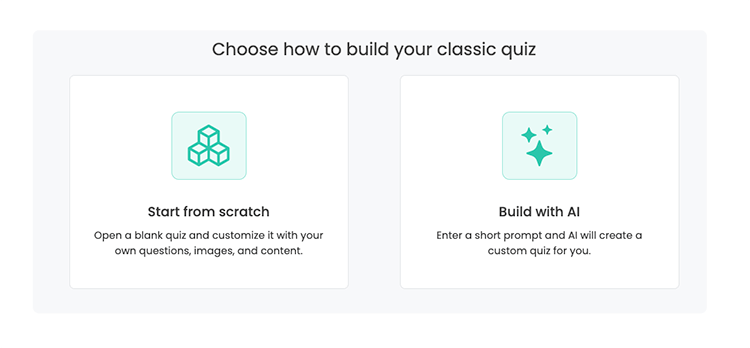
- Select Create a classic quiz.
-
Select Build with AI.
-
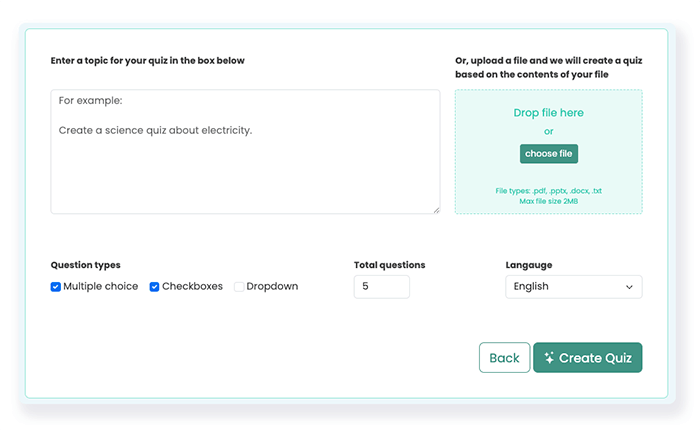
Then enter a prompt, a URL or upload a file
- Pick the types of questions you want, such as multiple choice, checkboxes, or drop-down.
- Choose how many questions you want AI to generate for you. You can generate up to 10 questions on the free plan or up to 50 on any paid plan.
- Choose the language for the questions and answer options.
- Click Create Quiz to submit the prompt and generate your quiz questions.
-
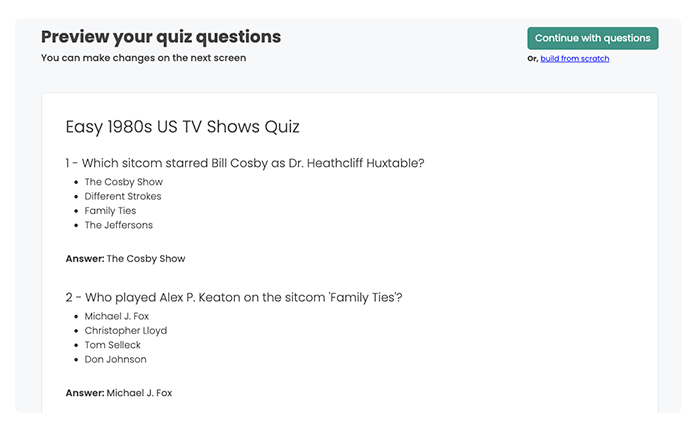
Preview your quiz questions. AI is not perfect, so we recommend checking for clarity, accuracy, and alignment with the topic you typed in the prompt.
- To keep the questions, click Continue with questions. To change all the questions, scroll down the page and click Update prompt.
After you accept your questions, FlexiQuiz creates your quiz. Then, personalize it by customizing the style, configuration options, and how you want to share it with your target audience.
Top tips for writing prompts to generate quiz questions
The better the input you add to the prompt, the better the questions we can generate with AI. To help:
Define the topic scope clearly: If your topic is broad, try to narrow it down. This helps the AI create more specific questions.
Set the difficulty level: Describe who the quiz is for and how challenging it should be. (E.g. Students aged 18 with a good understanding of mathematics.)
Add a tone or theme: Enter the prompt if you want the quiz to be serious, engaging, or playful. For example, you can ask for a humorous and conversational quiz.
Check the length of your prompt: Your prompt must be between 10 and 1000 characters. If you are on the Essentials plan or higher, you can submit up to 10 AI-generated prompts per hour.
Frequently asked questions
How does FlexiQuiz generate the AI questions?
FlexiQuiz AI generates questions from information in the prompt box, such as a description or URL.
Questions are generated using ChatGPT.
Can I add AI questions to an existing quiz?
You can't add AI questions to an existing quiz.
However, you can create a quiz with AI-generated questions and add your own content.
Can I create a quiz in any language using AI?
You can generate questions in almost any language but information in the prompt must be in English, French, Spanish or German.
To customize the language on navigation buttons and messages, go to the Theme screen. Learn more about making a quiz in any language.
What types of questions can I create with AI?
You can include multiple choice, dropdown or checkboxes.
Once the AI-generated questions are added to your quiz, you can edit the question type and scoring.
Can I add questions with images or graphs using AI?
AI-generated questions do not include images or graphs.
Once the AI questions are added to your quiz, you edit the question and add media such as images, graphs, audio and videos. Learn more about adding images to your quiz.
Relevant help guides
Back


