


Adding extra attempts for a learner
FlexiQuiz allows you to set the maximum number of quiz attempts available to all learners.
If a learner has already used all of their attempts, you can manually grant additional attempts to specific individuals. This gives you the flexibility to manage extra attempts on a case-by-case basis, rather than making more attempts available to everyone.
How to add an extra attempt for learners
- First, create your quiz and set the maximum number of quiz attempts. Learn more about setting the maximum number of quiz attempts.
- Share the quiz with your learners. If a learner uses all of their available attempts, you can manually grant them additional attempts.
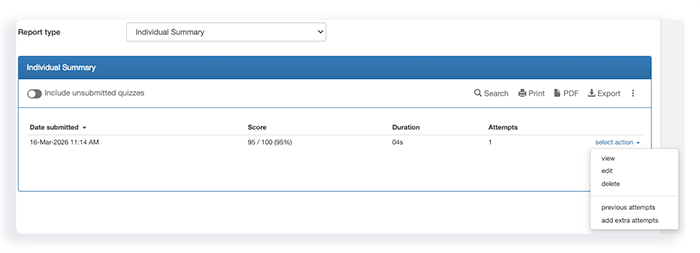
- Go to the Analyze screen and select the Individual Summary report type.
- Locate the learner. Use the search bar to quickly find their details.
- Click select action.
- From the drop-down menu, choose add extra attempts.
- A window will appear where you can enter the number of additional attempts you would like to give the learner. The maximum number of extra attempts available matches the maximum attempts configured for the quiz. For example, if the quiz allows 3 attempts, you can grant an individual learner up to 3 additional attempts.
- Click Save.
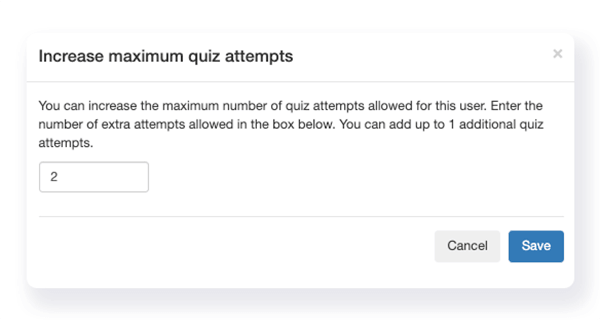
The learner now has extra attempts to complete the quiz.
Frequently asked questions
How Does the Learner Access Their Extra Quiz Attempts?
Learners access their additional attempts in the same way they originally accessed the quiz.
Respondent portal: Learners sign in to their FlexiQuiz Respondent portal using their unique username and password.
The learner clicks on the relevant quiz to take their additional attempts.
Email invitation: Learners can reopen the quiz using the unique link provided in the email invitation you sent.
How can I find out how many times the learner has taken the test?
To view the number of attempts the learner has had:
- Go to the Analyze screen.
- Select the Individual summary report type.
- Click on the 3 dots on the top right of the table.
- In the drop-down menu, click Configure. The list of Report fields will open.
- Tick Attempts.
- Click Save.
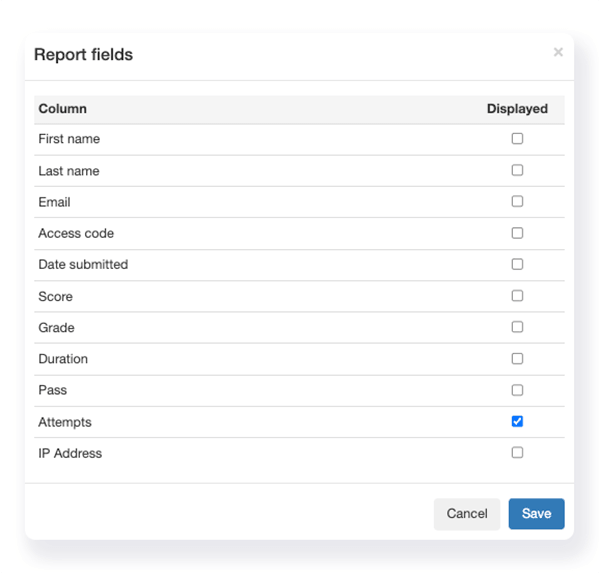
A new column will be added to the table showing the number of attempts for each learner.
If you grant extra attempts to individual learners, the Attempts column will display only the additional attempts awarded, rather than the combined total of the original and extra attempts.
Can I review the learners’ previous attempts?
Yes, you can view the learner’s previous attempts from the Analyze screen.
- Click select action.
- Choose previous attempts from the drop-down menu.
Relevant help guides:
Allow learners to retake incorrect answers only
Setting retakes for a fail grade only
Setting a schedule for a quiz to open and close
Back


