


Billing and Payment
Account Administrators can manage the FlexiQuiz subscription through the Billing and subscription section on the Settings screen.
The guide includes all the key information on FlexiQuiz billing; should there be anything that we have overlooked, please log in and get in touch with our support team.
Who are the Admins on a FlexiQuiz account?
Each FlexiQuiz account has one main administrator, usually the individual who set up the account.
If the main Admin subscribes to a Premium, Enterprise, or Enterprise+ plan, they can add extra Admins who can create quizzes and manage the FlexiQuiz subscription. Learn more about extra Admins.
How do I sign up for a FlexiQuiz subscription?
Once you have a free plan, the main account Admin can sign up for a subscription from our pricing page.
- First, select the plan that suits your requirements according to the number of responses you need, the customization options available, or the key features such as the APIs.
- Click the toggle to choose between paying monthly or paying annually to save money.
- After you have decided on the type of plan and your payment frequency, click the Upgrade Now button.
- Now choose whether you would like to pay by card through our payment processor, Stripe, or by PayPal.
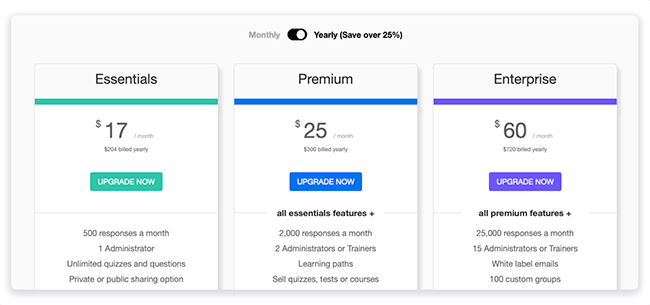
As soon as your payment has been processed, you'll have immediate access to your new FlexiQuiz features.
Just how much will I be able to save by choosing an annual plan?
Depending on your FlexiQuiz subscription, you can save up to $348 a year!
For instance, you would save $96 each year if you selected the Essentials plan on an annual basis rather than going with the monthly plan. That's more than three months free!
The Premium yearly plan saves you $168 compared to paying monthly. So if you pay yearly, you get more than four months free.
By selecting our Enterprise annual plan, you will save $348 each year if you pay on a monthly basis. That's almost four months free!
At any time, you can move from paying on a monthly basis to paying on an annual basis so you can enjoy the FlexiQuiz benefits all year.
Accepted payment methods
You have the option of paying for your FlexiQuiz subscription with any of the major payment cards, such as Visa, MasterCard, American Express, Discover, Diners Club, UnionPay, and Carte Bleue, or you can buy any FlexiQuiz plan using PayPal.
Our payment provider, either Stripe or PayPal, securely handles all payments.
Invoices can be provided for our Premium, Enterprise, and Enterprise+ annual subscriptions, the payments to be made by bank transfer or by check. A processing fee of $100 is charged when a bank transfer is used. Please get in touch with us to arrange an invoice.
As regards monthly subscriptions, we will accept payments only by card or by PayPal.
You can cancel auto-renew at any time
You always have the option of cancelling your FlexiQuiz subscription if you'd like a break from making quizzes, and you'll continue to have access to all your paid features until the end of the present billing cycle.
- The first step is to log in to your FlexiQuiz account.
- Choose the Settings tab from the top menu.
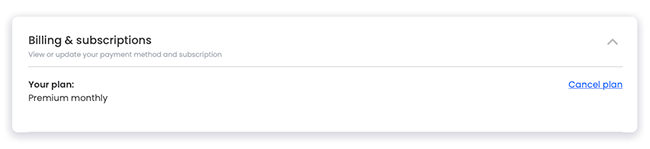
- Go down the page to the section on Billing and subscriptions, and beside your plan there is a cancellation option.
- If you choose to cancel the plan, a pop-up window will come up to confirm that you want to cancel.
- If you still wish to cancel, please click on the cancel option. A pop-up window will then show, asking you the reason for wanting to leave. We would really appreciate it if you could share your reason for leaving FlexiQuiz, as it will help us improve.
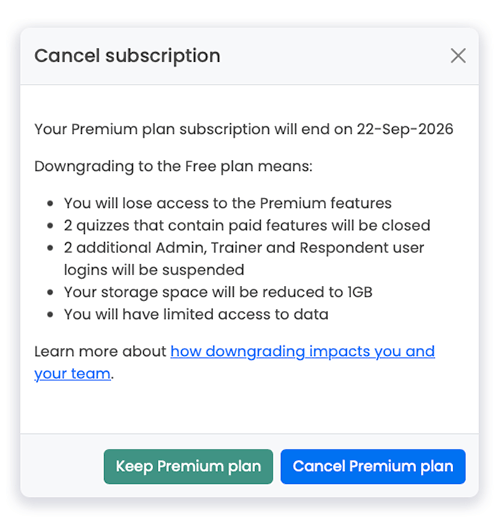
Your FlexiQuiz account will switch to the free plan on your next billing date. This means:
- The quizzes, courses, and learning material that you created on FlexiQuiz are kept, but you will no longer be able to share any content that includes paid features such as images, video, or audio.
- We will suspend any additional Administrator or Trainer accounts.
- Access to the data is now limited so that you can have no more than 20 responses per quiz.
- You cannot send or get email notifications anymore.
- All Groups are suspended.
- Depending on your plan type you will no longer be able to access features like Google integrations, APIs or SMTP integration.
- We may delete all of your response data after one month. The response data is the information displayed on the Analyze and Results screens.
The guide provides further details about all the features available in the free plan.
We save your quizzes and keep them available if you choose to upgrade within 6 months.
How to change your billing information
The main Admin may at any time update the billing details by carrying out these steps.
- Go to the Settings option in the top menu of your FlexiQuiz account.
- In the Billing and subscriptions section, click on Manage.
- You can now enter your new card payment details and save them.
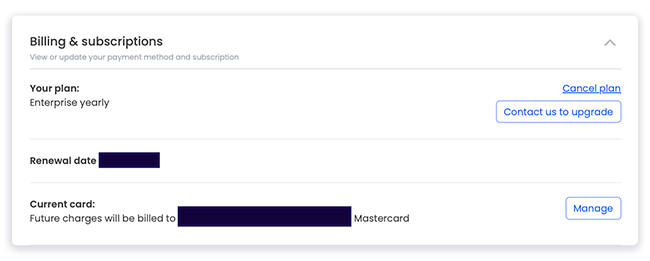
We will take all future payments from the new payment details you give us.
Changing receipt or invoice details
We automatically send the receipts to the main Admins email address; unfortunately, we are not able to send the receipt to another email address.
You have the option of changing the name, address, and tax or VAT ID that appears on the invoice for your organisation. In order to alter the invoice details:
- On the Settings screen, move down to the Billing and subscriptions section.
- In the Billing address section, click Update address.
- Please enter the correct details and then click Update address.

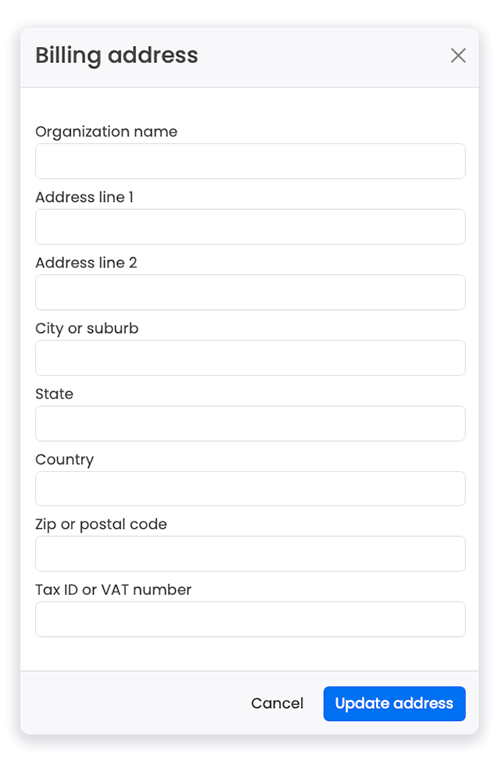
The new details will show up on your Settings screen.
When you have supplied us with your new details we will put them on all the invoices for any future transactions. Unfortunately, however, we are unable to alter an existing invoice.Currency billing options
All our plans are billed in US Dollars (USD).
If you would like to pay in a different currency, please contact us for more information.
Relevant help guides
Protect your account with Two-factor authentication
Back


