


Restricting access to quizzes by IP address
You can secure access to your tests by controlling which IP addresses are allowed to reach them.
FlexiQuiz lets you restrict test access to specific IP addresses or IP ranges. For example, you can allow access only from your school, office, or training center network. Anyone connecting from outside the approved IP range, such as a remote user, will be prevented from accessing the quiz.
How to set up IP restrictions
Admins with an Enterprise or Enterprise+ subscription can set IP restrictions for the whole account.
- Log in to your FlexiQuiz account and select Settings from the top menu.
- Click IP restrictions on the left-hand menu.
- In the Allowed IP addresses box, enter each IP address allowed to access your quiz content. Each IP address must be on a new line. You can use CIDR notation to enter a range of IP addresses.
- Then select the Restrict IP addresses toggle.
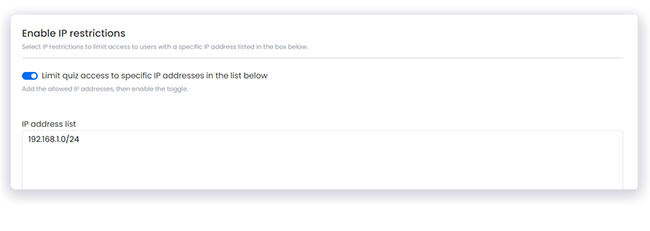
When the toggle is on, people can access your exam content only if they have one of the IP addresses you listed. If someone tries to register for your exam from a different IP address, they will be blocked.
You can switch the toggle on and off at any time.
Frequently asked questions
Do the IP restrictions apply to all my quizzes and exams linked to my main FlexiQuiz account?
Yes, the IP restrictions apply to all quizzes or material linked to your main FlexiQuiz account, including materials from other Admins and Trainers linked to your account.
Please ensure your colleagues know the IP restrictions are on to avoid disrupting their quizzes.
What happens if I leave the IP address field blank?
If you enable the IP restrictions toggle and leave the IP address list box blank, the system will block all IP addresses.
No one can access your online tests.
Can I restrict Trainer and Admin access based on their IP address?
No, it's currently not possible to restrict access by IP address for making and managing quizzes on Trainer and Admin accounts.
However, you can set permissions so that additional Admins and Trainers can only access the relevant parts of the quiz management process.
Can I switch restrictions on and off so that IP restrictions only apply to formal examinations?
Yes, you can select the toggle at any time so that when you publish a formal exam, it is fully protected.
What is CIDR notation?
CIDR notation is a compact way of writing an IP address range.
It combines an IP address with a slash and a number, for example:
192.168.1.0/24
The number after the slash tells you how much of the address identifies the network.
CIDR notation is useful when a school, office, or organization has a range of approved IP addresses. Instead of entering each IP address individually, you can enter the whole range at once.
Relevant help guides
Blog: Ways to minimize cheating
Back


