


Navigation buttons
People taking your quiz use the navigation buttons to move between different parts of your learning materials. For example, starting the quiz, moving between pages, and submitting the test.
FlexiQuiz enables you to customize the navigation buttons on your quiz. This helps you design a great-looking quiz and share wording that your learners understand.
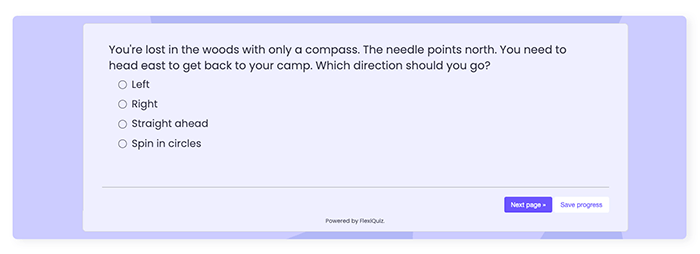
How to customize the navigation buttons.
You can customize the text, colors and positions of the buttons. It is not possible to change the font.
To start, create a quiz or open an existing one and then choose how you want to customize the buttons.
Quick color change for all buttons
- From the Create screen, click the styling icon to open the quiz designer.
-
Scroll down the screen to Button color and click on the circle to open the color picker.
- Then choose the background color for the button.
- To change the color of the text, click on the Button text circle and choose a color.
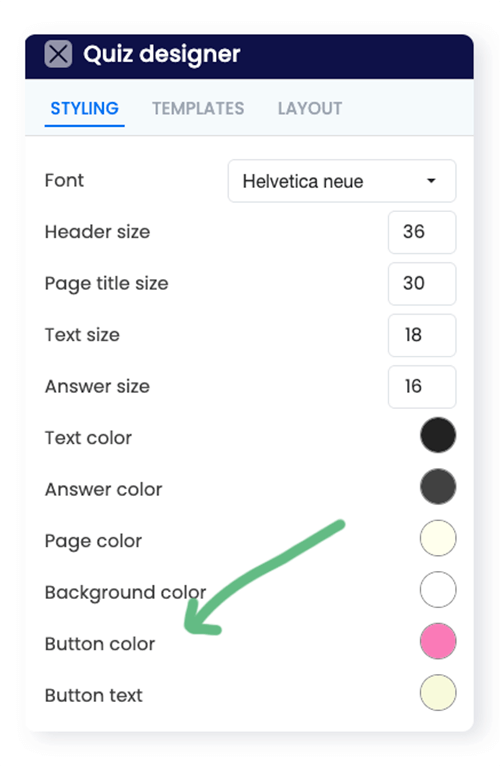
The FlexiQuiz system automatically saves any changes you make to the styling on your quiz.
Changing colors and text for individual buttons
- You can customize each button with its own color and text in any language.
- From the Configure screen, select Theme from the left-hand menu.
-
Then choose the messages tab. Nearly all the navigation buttons that respondents might see are listed.
- Select the relevant button and enter your text in the Button text box.
- Click on the Button color circle to change the background color.
- Click on the Text color circle to change the color of the text.
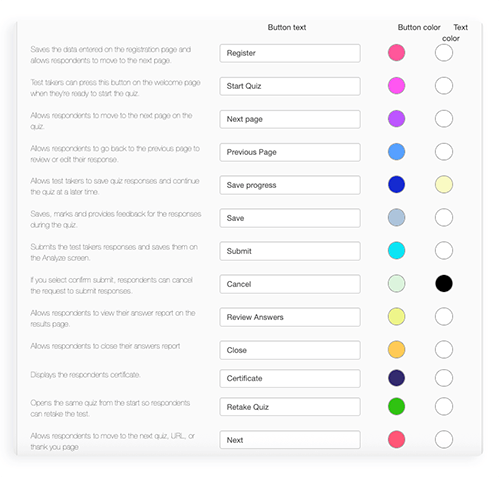
The FlexiQuiz system automatically saves any changes you make to your navigation buttons.
Top tip!
To ensure a good user experience when taking your quiz, it is essential to have a high color contrast between the button text and the background color. Respondents with visual impairments or low vision may not be able to read text that does not stand out clearly from the background.
You can check the contrast between the colors you pick using tools such as xxx
Relevant help guides
Back


