


Tab switching restrictions
Minimize cheating on your exams by preventing learners from switching tabs to open unauthorized materials or from browsing the internet for answers.
FlexiQuiz allows you to set the maximum number of times learners can switch tabs. Each time they switch tabs, they will see a warning message. If they attempt to switch tabs too many times, their quiz will automatically submit.
How to set the number of times learners can switch tabs
- Start by creating your exam.
- Then go to the Configure screen and select General from the left-hand menu.
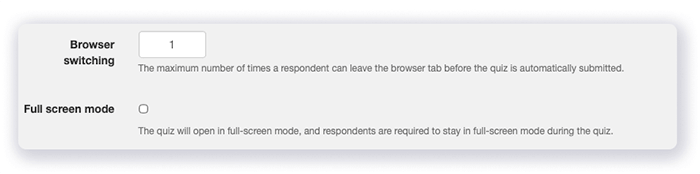
- Scroll down the page to the Browser switching section.
-
In the box, enter the maximum number of times that learners are allowed to switch browsers before the test is automatically submitted.
- Now you can customize the warning text that learners see. Select Theme on the left-hand menu.
- Choose the messages tab.
- Scroll down the page to the Progress messages section.
- Then go to the Browser switching warning message and the Browser warning submit message.
-
Now you can enter your text in any language.

Once the quiz is submitted, the results are available on your FlexiQuiz analyze screen.
How tab switching works
Try our test to see how tab switching works for test takers.
On this simple math test, you can switch tabs two times and then the quiz will automatically submit.
Frequently asked questions
Can I tell learners how many times they can switch tabs before the quiz submits?
Yes, FlexiQuiz allows you to configure the Browser switching warning message to tell learners how many times they can switch tabs before the quiz submits.
Enter the following text in square brackets. RemainingSwitchingEvents.
Can I track how many times learners switch tabs?
This will be a new feature launching later in 2026.
Relevant help guides
Setting maximum number of quiz attempts
Blog: Ways to minimize cheating
Back


